

Independent implementation: This calculator is provided by EasyInvestCalc. It is not the original Bret Whissel tool and does not imply affiliation or endorsement. Optional currency conversion requests public reference rates from an external service; it is not a bank conversion quote.
Bret Whissel Amortization Calculator
Estimate monthly loan payments, total interest, total amount paid, and view a detailed amortization schedule. You can add an extra monthly payment and optionally view results in another currency. Currency conversion is for reference only and does not change the underlying loan calculation.
Loan Details
Amortization Schedule
The schedule assumes monthly payments and a fixed annual interest rate divided by 12. Extra payments are applied to principal. The final payment is reduced if less than the scheduled amount is needed to clear the balance.
| Month | Payment | Principal | Interest | Remaining Balance |
|---|
Bret Whissel Amortization Calculator
Use the calculator above to estimate a fixed-rate loan’s monthly payment, total interest, total amount paid, and month-by-month amortization schedule. You can also test how an additional monthly payment may reduce the payoff time and interest under the assumptions entered. The tool is intended for standard monthly-payment estimates; it does not solve for a missing principal, rate, or term and does not include a balloon-payment input.
If you're looking for the Bret Whissel amortization calculator, you may be trying to calculate a loan payment, estimate total interest, or understand how a loan balance changes over time. This guide explains how to use the calculator on this page, what the results mean, and which assumptions to check before relying on an estimate.
Key Takeaways
- Estimate a monthly payment. Enter the loan amount, annual interest rate, and loan term.
- Review total interest and total paid. These estimates help compare fixed-rate scenarios.
- Use the amortization schedule. Each row shows payment, principal, interest, and remaining balance.
- Test extra monthly payments. The calculator assumes extra payments are applied to principal each month.
- Check the assumptions. Taxes, insurance, lender fees, variable rates, and special contract terms are not automatically included.
What Is the Bret Whissel Amortization Calculator, Exactly?
The name Bret Whissel amortization calculator is associated with a loan-calculation tool. The calculator provided on this EasyInvestCalc page is a separate implementation for estimating a fixed-rate loan payment and producing an amortization schedule. It should not be mistaken for an official or affiliated copy of another website’s calculator.
For a standard fixed-rate loan, the payment estimate depends on the starting principal, annual interest rate, and number of monthly payments. Changing any of these values changes the scheduled payment and the interest paid over the loan term.
A quick spelling note: the name is commonly searched as Bret Whissel, while some users enter variations such as Brett Whissel, Bret Whistle, or Brett Whistle. These variations can appear in search queries, but they should not be presented as official names.
A Loan Calculator With a Long History
Historical descriptions associated with the Bret Whissel calculator discuss an early version dating to 1986 and a later online version. Because historical details can vary between sources, verify dates and version claims against a reliable original source before treating them as definitive. For current visitors, the practical priority is understanding the inputs, assumptions, and repayment schedule shown by the calculator being used.

Loan calculators may differ in their treatment of rounding, payment timing, extra payments, and special loan terms. For a general explanation of amortization, read how loan amortization works.
How to Use the Bret Whissel Amortization Calculator
The calculator above has five main inputs. Enter the values that match your loan agreement or the scenario you want to test.
- Display Currency — select the currency symbol and number format you want to see. Currency selection changes display formatting; it does not change the underlying loan agreement.
- Loan Amount — enter the starting principal balance.
- Annual Interest Rate — enter the annual fixed interest rate as a percentage, such as 6.9 for 6.9%.
- Loan Term — select the number of monthly payment periods. A five-year term normally has 60 monthly payments; a 30-year term normally has 360.
- Extra Payment Per Month — enter any additional amount you plan to pay each month. The calculator assumes this extra amount is applied to principal.
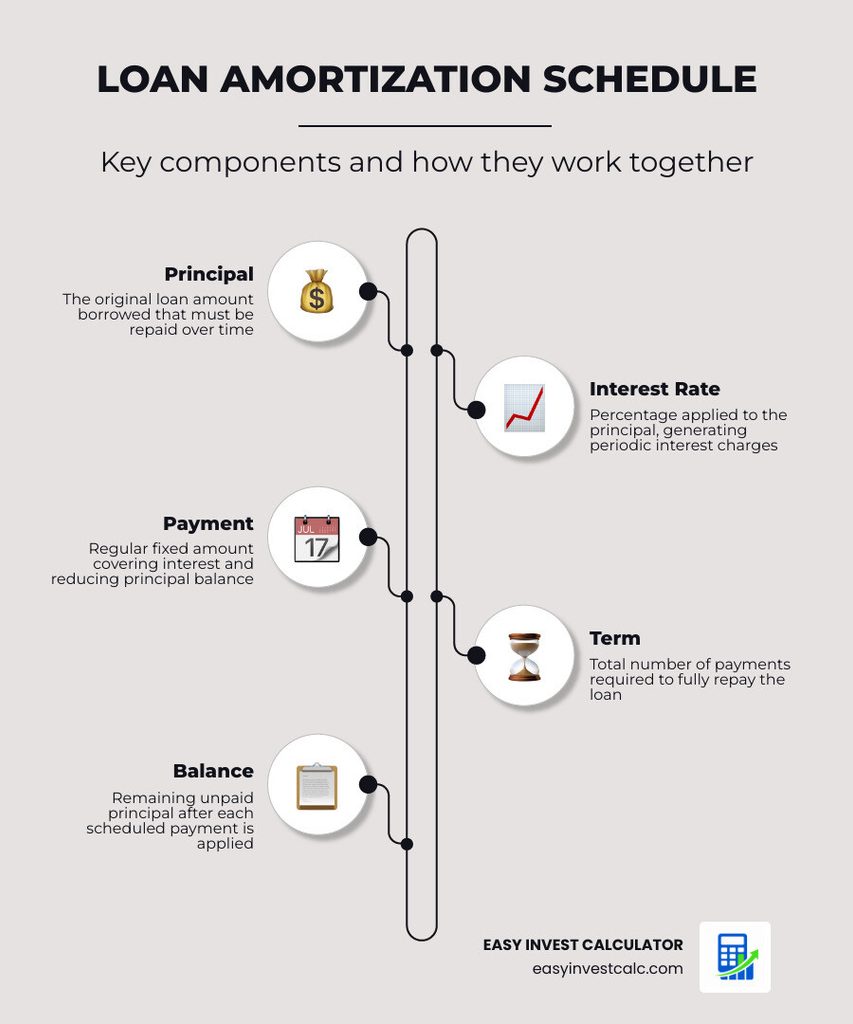
For example, consider a $20,000 fixed-rate loan at 6.9% annual interest over 60 months. Enter the loan amount, rate, and term, leave extra monthly payment at zero, and select Calculate Result. The calculator estimates the regular payment and shows the interest, principal, and remaining balance for each month. Your actual lender calculation may differ because of fees, timing, and rounding rules.
If you want to explore an auto-loan repayment example, see the Auto Amortization Schedule.
Understanding a Bret Whissel Amortization Schedule
An amortization schedule breaks a loan into individual payment periods. Each row in the table shows the payment amount, interest charged during that period, the portion applied to principal, and the remaining balance.
At the beginning of many fixed-rate amortizing loans, a larger share of each payment goes toward interest because the outstanding principal balance is higher. As the balance falls, the interest portion generally becomes smaller and more of the payment goes toward principal.
Reviewing the schedule is often more informative than looking only at the monthly payment. It shows the estimated pace of repayment and how the balance changes over the selected term.
What “Normal” Looks Like: Using Loan Rates Carefully
Interest rates change over time and vary by loan type, lender, borrower, credit profile, loan amount, and other factors. Rather than treating a published average as a quote, use the actual rate offered by your lender when running an amortization calculation.
If you are comparing scenarios, enter different rates into the calculator and compare the monthly payment, interest cost, and schedule.
| Loan Type | Rate Input | Example Term |
|---|---|---|
| 30-Year Fixed Mortgage | Enter your quoted rate | 360 months |
| 15-Year Fixed Mortgage | Enter your quoted rate | 180 months |
| New Car Loan | Enter your quoted rate | 60–72 months |
| Used Car Loan | Enter your quoted rate | 60–72 months |
| Personal Loan | Enter your quoted rate | 24–60 months |
| Other Installment Loan | Enter the rate in your agreement | Based on loan agreement |
The examples above show how to structure a calculation; they are not current lender offers. Your actual interest rate and loan terms depend on the lender and your individual circumstances.
When comparing a loan offer, use the actual rate and terms in your agreement rather than relying on a general market average. For mortgage-related information, consumers can also review the Consumer Financial Protection Bureau’s mortgage resources.
Balloon Payments and Negative Amortization
A balloon payment is a large payment due at the end of a loan term when the regular payments have not fully paid off the balance. The calculator on this page does not have a balloon-payment input, so it should not be used as a precise model for a balloon loan. For that scenario, use our Amortization Schedule with Balloon Payment.
Negative amortization occurs when a payment is not enough to cover the interest accruing during a payment period and unpaid interest is added to the balance. This calculator does not model capitalized unpaid interest as a special loan feature. If a payment is too small to reduce the balance under the calculator’s assumptions, it displays a validation message rather than presenting a negative-amortization schedule.
Common Mistakes When Using an Amortization Calculator
Entering formatted currency into a number field. If the calculator does not accept commas or currency symbols, enter 200000 instead of $200,000.
Entering the wrong interest-rate format. The Annual Interest Rate field expects an annual percentage such as 6.9 for 6.9%. Do not enter the monthly rate unless a calculator specifically asks for it.
Using the wrong number of payment periods. A five-year loan with monthly payments generally has 60 periods, while a 30-year mortgage with monthly payments generally has 360.
Ignoring additional loan costs. A basic amortization calculation does not automatically include property taxes, homeowners insurance, PMI, HOA dues, lender fees, origination charges, or other costs.
Assuming every loan amortizes in exactly the same way. Loan agreements can use different payment frequencies, rate structures, rounding rules, prepayment provisions, and other terms. Compare the calculator’s assumptions with your actual agreement.
Pro Tip: If a result looks unexpected, check the principal, annual interest rate, loan term, and extra payment first. A single incorrect input can materially change the result.
Extra Payments and Loan Payoff Scenarios
Paying more than the required amount can reduce the outstanding principal faster when the additional amount is applied to principal under the loan’s terms. Reducing the principal earlier can lower future interest charges and may shorten the payoff period.
For a calculator specifically designed around additional principal payments, see the Amortization Calculator with Extra Payments. You can also read Extra Payments: The Secret Sauce for Debt Freedom.
A standard amortization calculator is useful for consistent-payment scenarios, while a spreadsheet or specialized calculator may be more convenient when your payment pattern changes from month to month.
Use a standard web calculator for:
- Quick loan-payment estimates
- Comparing interest-rate scenarios
- Estimating total interest under a fixed-rate assumption
- Reviewing a month-by-month amortization schedule
- Understanding how principal and interest change over time
A spreadsheet may be more useful for:
- Irregular extra payments
- Multiple payment scenarios
- Detailed budgeting
- Custom tax or insurance tracking
- Long-term record keeping
Frequently Asked Questions
Is the Bret Whissel amortization calculator free to use?
The calculator provided on this EasyInvestCalc page is free to use. It is an independent implementation and is not presented as an official or affiliated copy of another website’s calculator.
Why can the final payment be slightly different?
Loan calculations involve rounding interest and payment amounts to cents. Depending on the calculation method and lender rules, the final payment can differ slightly from earlier scheduled payments.
Can I use an amortization calculator for a car loan?
Yes. Standard fixed-rate, fixed-payment loan mathematics can be used for many auto loans. Enter the principal, annual interest rate, number of monthly payments, and any extra payment you want to test.
What's the difference between “Bret Whissel” and “Brett Whissel”?
Bret Whissel is the spelling used in the calculator name on this page. Some searchers may type variations such as “Brett Whissel,” “Bret Whistle,” or “Brett Whistle,” but those should be treated as spelling variations rather than official names.
Does the calculator provide an amortization schedule?
Yes. The calculator generates a schedule showing the payment number, payment amount, interest portion, principal portion, and remaining balance based on the values entered.
Can I use an amortization calculator for a mortgage?
Yes. A mortgage can be estimated using principal, interest rate, number of payments, and payment assumptions. A basic principal-and-interest calculation does not automatically include property taxes, homeowners insurance, PMI, HOA dues, or lender-specific fees.
What is a balloon payment?
A balloon payment is a larger payment due at the end of a loan term when regular payments have not completely paid off the balance. This page’s calculator does not include a balloon-payment input; use a balloon-payment-specific calculator for that scenario.
What is negative amortization?
Negative amortization occurs when the payment is not enough to cover the interest accruing during the payment period and unpaid interest is added to the balance. This calculator does not model that loan feature.
What is the crossover point in an amortization schedule?
The crossover point is commonly used to describe when the principal portion of a scheduled payment becomes larger than the interest portion. The timing depends on the loan balance, interest rate, payment amount, and term.
Your Next Step
Enter your loan amount, annual interest rate, loan term, and any extra monthly payment in the calculator above. After calculating, review the amortization schedule rather than looking only at the monthly payment. The schedule shows how much of each payment goes toward interest, how much reduces principal, and how the balance changes over time.

Use the result as an estimate and compare the assumptions with your actual loan documents or lender quote before making a borrowing decision.
This article is for educational purposes only and isn't financial, legal, or tax advice. Loan terms, rates, fees, and calculator behavior can vary. Verify important figures with your lender and review your loan agreement before making a borrowing decision. EasyInvestCalc is not affiliated with Bret Whissel or bretwhissel.net.

Founder of EasyInvestCalc.com with 8+ years of experience in personal finance. Sunita simplifies complex financial mathematics—from SIP compounding to tax planning—empowering Indian investors to make smart, debt-free decisions based on real market mechanics.